Alert Reporting
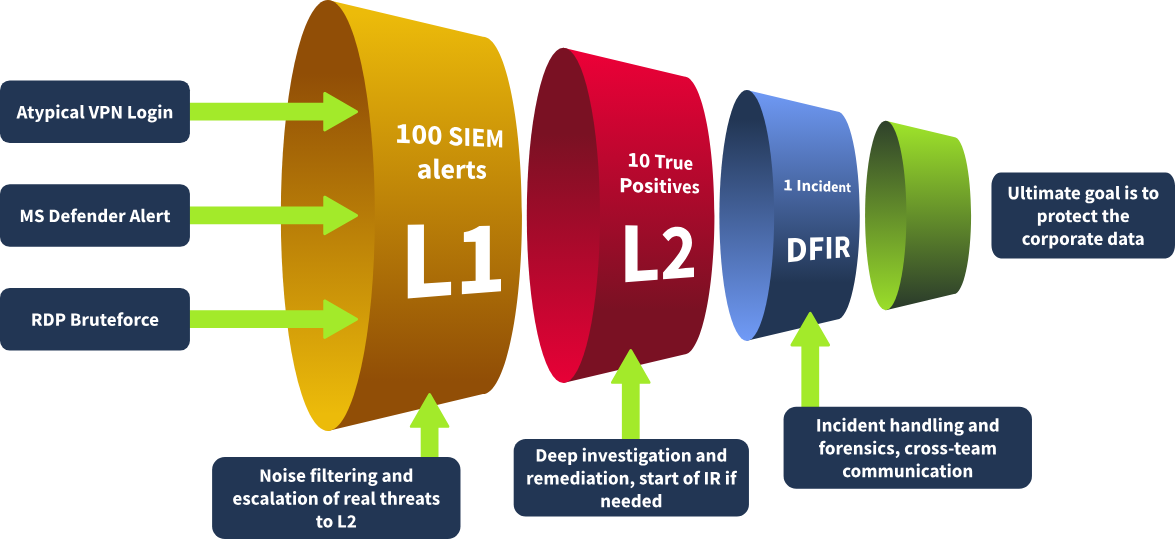
Alert Funnel
Alert Reporting
Before closing or passing the alert to L2, you might have to report it. Depending on team standards and alert severity, instead of a short alert comment, you can be required to document your investigation in detail, ensuring all relevant evidence is included. This is especially important for True Positives, which require escalation.
Alert Report Purpose
- Provide context for escalation
- A well-written report saves lots of time for L2 analysts
- Also, it helps them quickly understand what happened
- Save findings for the records
- Raw SIEM logs are stored for 3-12 months, but alerts are kept indefinitely
- As a result, it's better to keep all the context inside the alert, just in case
- Improve investigation skills
- If you can't explain it simply, you don't understand it well enough
- Report writing is a great way to boost L1 skills by summarising alerts
Report Format
- Who: Which user logs in, runs the command, or downloads the file
- What: What exact action or event sequence was performed
- When: When exactly did the suspicious activity start and ended
- Where: Which device, IP, or website was involved in the alert
- Why: The most important W, the reasoning for your final verdict

Alert Escalation
If the True Positive alert requires additional actions or deeper investigation, escalate it to the L2 analyst for further review following the agreed procedures. That's where your alert report comes in handy since L2 will use it to get the initial context and spend less on the analysis from scratch.
You should escalate the alerts if:
- The alert is an indicator of a major cyberattack requiring deeper investigation or DFIR
- Remediation actions like malware removal, host isolation, or password reset are required
- Communication with customers, partners, management, or law enforcement agencies is required
- You just do not fully understand the alert and need some help from more senior analysts
Escalation Steps
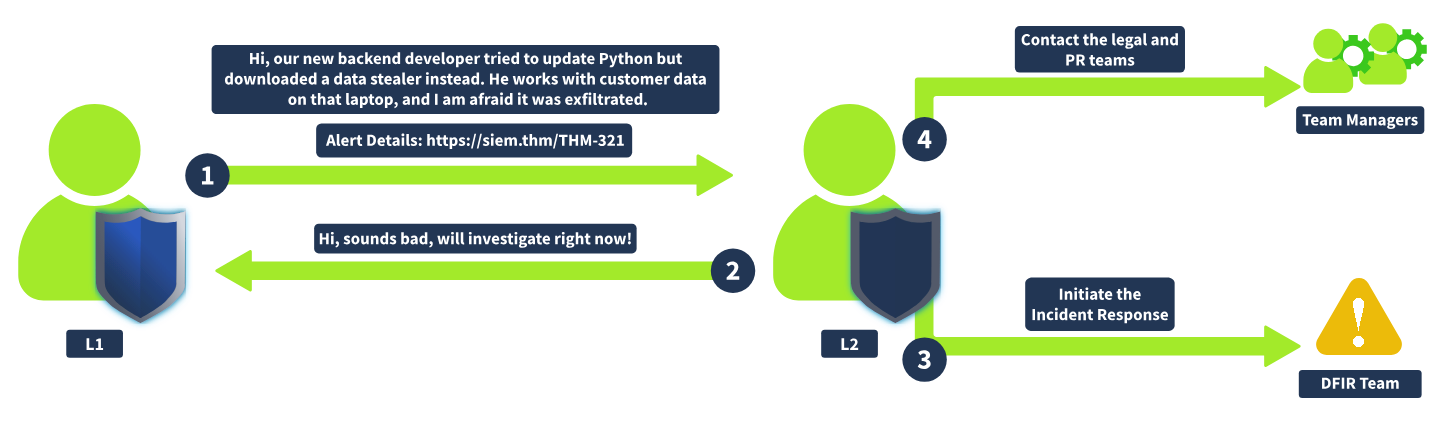
To escalate the alert, in most cases, all you have to do is to reassign the alert to the L2 on shift and ping them in corporate chat or in person. In some teams though, you may be required to create a formal written escalation request with dozens of required fields.
No matter what the agreements are, L2 will eventually receive the ticket from you, read your report, and contact you in case of any questions. Once everything is clear, the L2 analyst will typically research the alert details further, validate if the alert is indeed a True Positive, communicate with other departments if needed, and, for major incidents, start a formal Incident Response process.
Requesting L2 Support
It is generally fine for L1 to request senior support if something is unclear. Especially in your first months, it's always better to discuss the alert and clarify SOC procedures than to blindly close the alert you don't understand yourself.
Communication
You may also need to communicate with other departments during or after the analysis. For example, ask the IT team if they confirm granting administrative privileges to some users or contact HR to get more information about the newly hired employee.
The escalation and reporting topics should sound straightforward and logical to you. But, as always, it's easier said than done, and you should be prepared for unexpected scenarios and know what to do in critical cases. In the best scenario, the SOC team has its own Crisis Communication procedures - the guides and processes to help you and your teammates resolve the issues. If not, you are advised to read the cases below and be prepared to handle them effectively.
Communication Cases
- You need to escalate an urgent, critical alert, but L2 is unavailable and does not respond for 30 minutes.
Ensure you know where to find emergency contacts. First, try to call L2, then L3, and finally your manager. - The alert about Slack/Teams account compromise requires you to validate the login with the affected user.
Do not contact the user through the breached chat - use alternative contact methods like a phone call. - You receive an overwhelming number of alerts during a short period of time, some of which are critical.
Prioritise the alerts according to the workflow, but inform your L2 on shift about the situation. - After a few days, you realise that you misclassified the alert and likely missed a malicious action.
Immediately reach out to your L2 explaining your concerns. Threat actors can be silent for weeks before impact. - You can not complete the Alert Triage since the SIEM logs are not parsed correctly or are not searchable.
Do not skip the alert - investigate what you can and report the issue to your L2 on shift or SOC engineer.